If you're running Windows 11 and the Start Button & Search Box are unresponsive, it's likely that the Start Menu Experience process is crashing.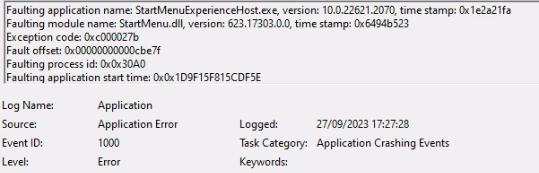
This was, in this case, caused by a bug in Acronis backup tool, specifically the Device Control feature. Acronis are working on a fix but it's advisable to disable Device Control in the Acronis portal. The Start Menu and Search Box will work normally after.
https://kb.acronis.com/content/72828
72828: Acronis Cyber Protect Cloud: Windows Start button and Find not working after Windows update KB5030219 if Advanced DLP or Device Control service is enabled
Applies to:
Last update: 25-09-2023
Symptoms
- Cyber Protect Cloud Agent is installed on physical Windows 11 machines
- Advanced DLP or Device Control feature is enabled in the protection plan
- After updating Windows to KB5030219, the Start button and Find are no longer working.
Cause
Issue in the product.
Acronis Development team is working on a fix.
This issue will be resolved in one of the upcoming releases.