This article deals with Wildix Collaboration being unable to make or receive calls as it has no access your camera and microphone.
If you are in the situation of being unable to receive calls in Collaboration or, when you try to make a call, you just hear a "Duh duh duh" tone in your headset, it is likely that your web browser has limited Collaboration's access to the microphone and/or camera.
This can happen occasionally. An update to your web browser may make adjustments to the security settings or another app can limit access.
To resolve this, try these steps:
- Click on the padlock in the address bar of your browser and check that the Camera and Microphone are enabled:

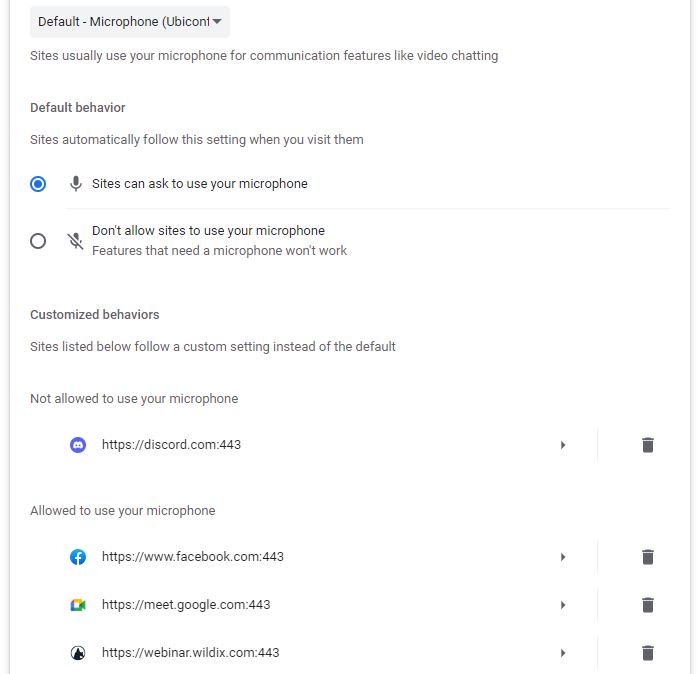
If one or the other are, click on the slider to the right to enable them - If that does not work, click on Settings in your browser, navigate to Privacy & Security, then Site Settings and check that access to the Camera and Microphone is Allowed and that your website does not appear in the list of sites Not allowed to use your Camera / Microphone:

| Need help? Please get in touch! |
|
You can call us on 01752 393600, option 2 or, if you are on Number Club, just call extension 3000 You can email us at support@hellocomtec.com You can chat with us now at https://kite.wildix.com/nc-a12/3000 |
